


Car Rental Process and Tips for Foreign Travelers Using the “一嗨租车” (eHi) App
(I) Required Documents Before Rental
1. Original Passport (With a Valid Visa)
2. Temporary Driving Permit
> May be obtained at a vehicle administration office.
> Some airports also provide services for applying for a Temporary Driving Permit.
> International Driving Permit (IDP) is not accepted.
3. A personal Visa/Mastercard credit card (for deposit pre-authorization): Foreign travelers can only use a Visa/Mastercard credit card issued in their own name for deposit pre-authorization, or use their personal domestic WeChat Pay or Alipay credit score authorization to rent without a deposit. Travelers without a credit card may ask a domestic friend or relative to pay the deposit at the store using a UnionPay card.
(II) Downloading and Registration
1. Option 1: “一嗨租车” (eHi) App
Search for the “一嗨租车” (eHi) App in your mobile App store, then download and install the App. Open the App, tap “注册” (Register), and sign up using a Chinese mainland mobile phone number. Follow the instructions to set a password and complete registration by entering the SMS verification code.
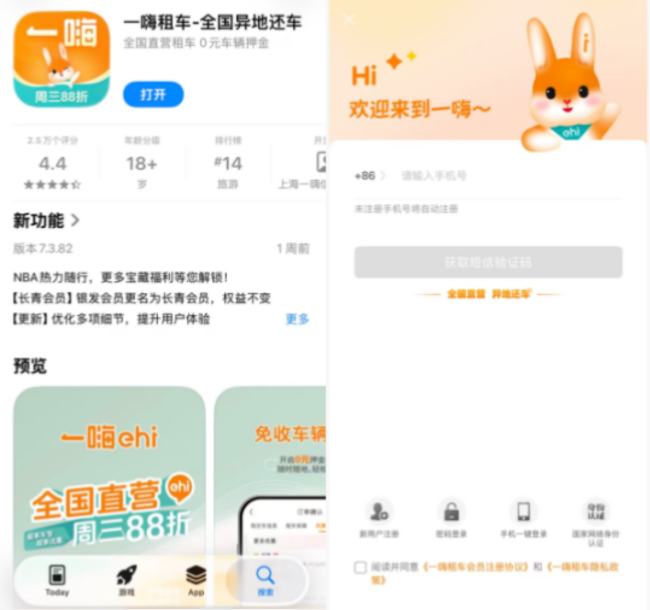
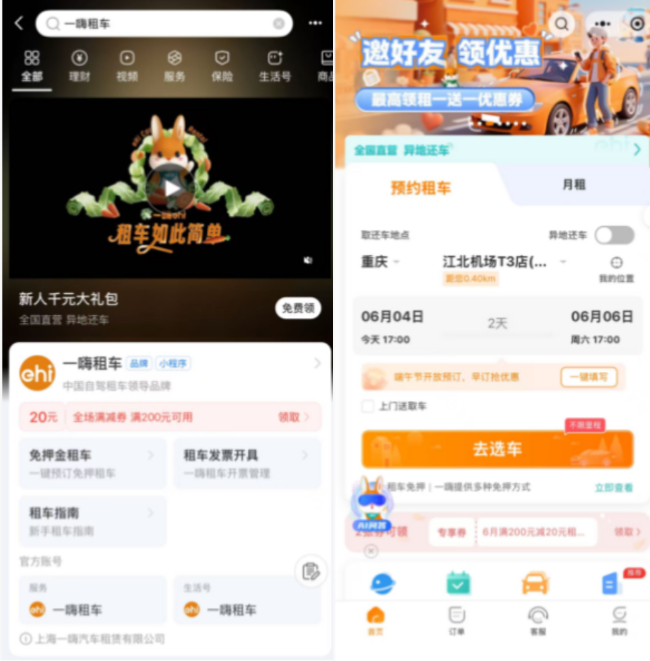
Option 2: “一嗨租车” (eHi) Mini Program
Search for the “一嗨租车” (eHi) Mini Program on WeChat or Alipay. Authorize registration using your WeChat account or Alipay account.
(III) Required Documents
1. Identification Documents:
For foreign travelers, valid entry and exit documents, including:
> The Passport or Other Valid Entry and Exit Documents Held Upon Entry into China;
> Valid Visa;
> Stay Permit or Residence Permit; or
> Foreign Permanent Resident ID Card
2. Driving Documents:
> A Driving License of the People’s Republic of China; or
> Temporary Driving Permit Issued by the Traffic Management Bureau of China’s Ministry of Public Security
3. How to Apply for a Temporary Driving Permit
(1) Preparing the Following Documents:
① Entry and Exit Documents, such as
> A Passport;
> Mainland Residence Permit for Hong Kong, Macao, and Taiwan Residents;
> Mainland Travel Permit for Hong Kong and Macao Residents;
> Mainland Travel Permit for Taiwan Residents; or
> People’s Republic of China Travel Document
② An Overseas Driving License
③ If your overseas driving license is not in Chinese, you must also have it translated into Chinese. You may apply for translation by email through a translation agency, or visit a Public Security Vehicle Administration Service Counter, where staff can assist you with the translation application.
(2) Bring the above documents to the nearest Public Security Vehicle Administration Service Counter to have your photo taken and submit your application. After attending the traffic safety education session on Chinese road traffic laws and regulations organized by the Traffic Police Department, the permit will be issued on site.
(IV) Verification Process
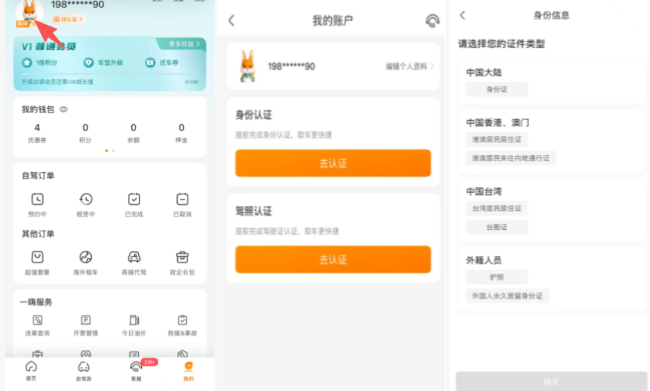
After successfully registering and logging in, tap “我的” (My) at the bottom of the App interface, then tap the avatar and follow the instructions to complete verification. Upload your identification documents and a Driving License of the People’s Republic of China or Temporary Driving Permit. After uploading the required documents, submit your application for review. Once your application has been approved, you can proceed with the next steps of the car rental process.
(V) Verification Time and Processing Methods
1. Online Verification: The review result is usually provided within one working day. You may also contact online customer service through the “一嗨租车” (eHi) App or call the customer service hotline at 400-888-6608 to request expedited review.
2. In-Store Verification: Bring all required original documents to any “一嗨租车” (eHi) physical store. Staff will assist with registration, real-name identity verification, and vehicle booking and pickup on site.
(VI) Booking Process
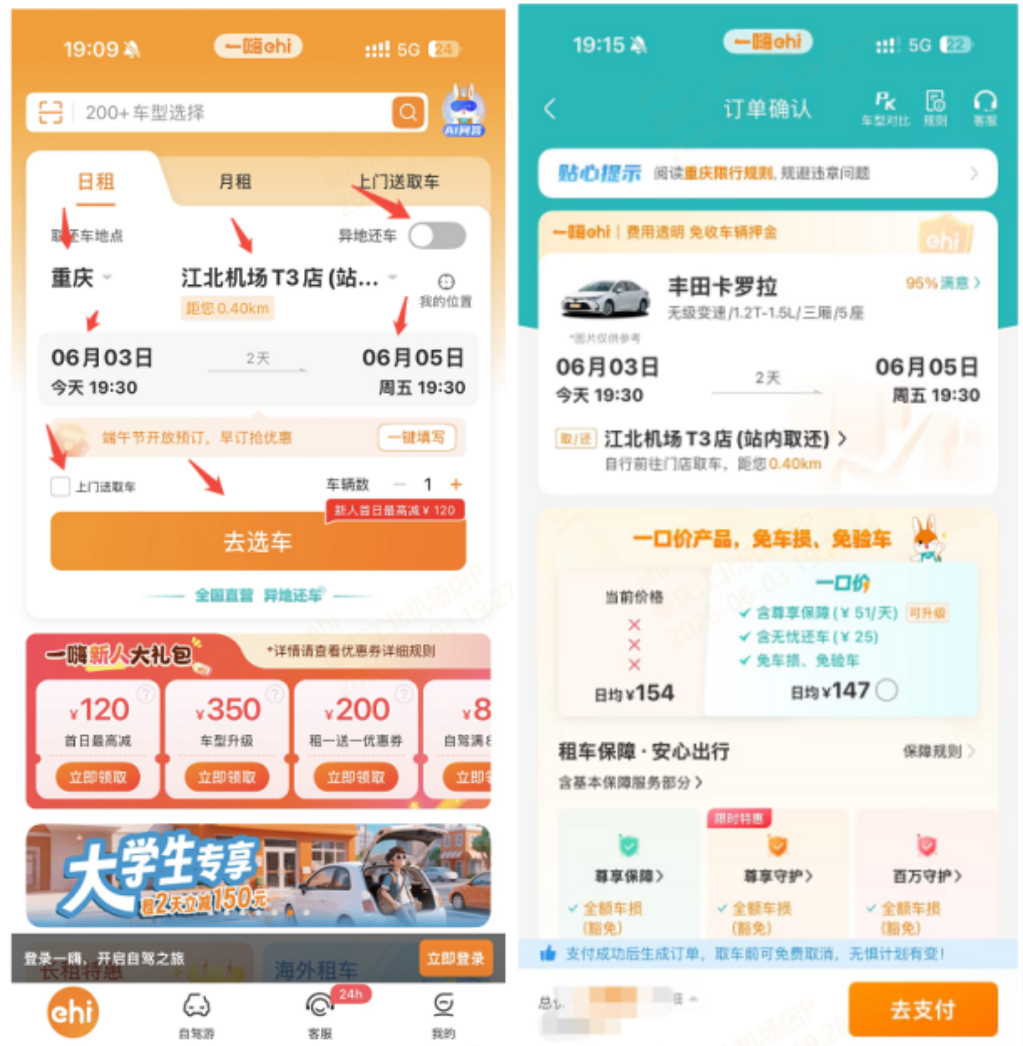
1. After completing identity verification, go back to the homepage of the App or Mini Program. 1)Select the pickup time, return time, pickup and return cities, and rental locations; 2)Tap “去选车” (Select a car) to enter the vehicle selection page and choose a vehicle based on the vehicle type and average daily rental price; 3)Tap the selected vehicle to enter the “订单确认” (Order Confirmation) page, where you can view order details, the car rental service contract, and the booking service agreement; and 4)Select optional protection services as needed, then submit the order to complete the booking.
2. Payment Methods
Accepted payment methods:
> Alipay;
> WeChat Pay;
> UnionPay (UnionPay Mobile QuickPass);
> Domestic Credit and Debit Cards;
> Huabei;
> Third-Party Payment Made on the User’s Behalf by a Domestic Contact
(VII) Vehicle Pickup at Rental Locations (Staff-Assisted/Self-Service/Hive Locker)
1. Staff-Assisted Pickup
(1) The renter who made the reservation must be present and provide all required original documents. Staff will verify and keep records of the documents.
(2) Complete credit card deposit pre-authorization, or authorize a deposit-free rental through personal domestic WeChat Pay/Alipay credit score services.
(3) Staff will assist with a full vehicle inspection.
(4) Receive the vehicle keys and pick up the vehicle.
2. Hive Locker Pickup
(1) On the order page in the App, tap “自助取车” (Self-Service Pickup) → complete facial verification/SMS verification → scan the QR code to open the Hive Locker and retrieve the keys.
(2) Locate the vehicle, take photos of the entire vehicle, and upload them to the system. After completing the online vehicle inspection, you can start driving.
3. Self-Service Pickup for Vehicles with Self-Service Pickup and Return
(1) On the order page in the App, tap “自助取车” (Self-Service Pickup) → complete facial verification/SMS verification.
(2) Locate the vehicle, take photos of the entire vehicle, and upload them to the system to complete the online vehicle inspection.
(3) Enter the vehicle control page through the order details and use your phone to lock/unlock the vehicle. You can then start driving.
(VIII) Vehicle Return Process
1. Confirm Fuel Level: The fuel level upon return should be the same as when the vehicle was picked up. If the fuel level is lower than required, additional fuel charges plus a RMB75 service fee will apply. No additional charges apply if the vehicle is returned with a full tank.
2. Staff-Assisted Return: Staff at the rental location will reinspect the vehicle condition against the vehicle inspection checklist. If no damage is found, the credit card deposit pre-authorization will be released, and the return process will be completed.
3. Self-Service Return: Park the vehicle in the designated parking space, leave the keys inside the vehicle, use the App to take photos of the vehicle condition and upload them, submit the information for review, and complete the return process.
